
Streaming Locators
Streaming Locators provide an entry point to access the files contained in an Asset and allow you to attach policies for DRM, access, and manifest re-writes: they enable your videos and live streams to be accessed by external clients.
A Streaming Locator provides a unique link for an asset or live event that will be processed by a Streaming Endpoint.
The final URL pattern for your video will be a concatenation of the Streaming Endpoint domain name and the Streaming Locator that links to your asset. The names you assign to each resource will determine the path URL of your video.
To make video assets available to clients for playback, you must create a Streaming Locator and then build streaming URLs once you have a functional Streaming Endpoint.
By default, the Streaming Locator is valid immediately after it is created and lasts until it is deleted. Once created, Streaming Locators remain assigned to that Asset until either the Streaming Locator or the Asset is deleted. Streaming Locators can have their own expiry dates and configuration properties, enabling you to manage how and until when your content can be accessed.
When creating a Streaming Locator, you must specify an Asset name and a Streaming Policy name. The Streaming Policy can optionally point to a Content Key Policy for encryption. See Content Keys for more information.
A Streaming Endpoint must exist to play your Streaming Locator and enable you to scale your output based on viewer concurrency.
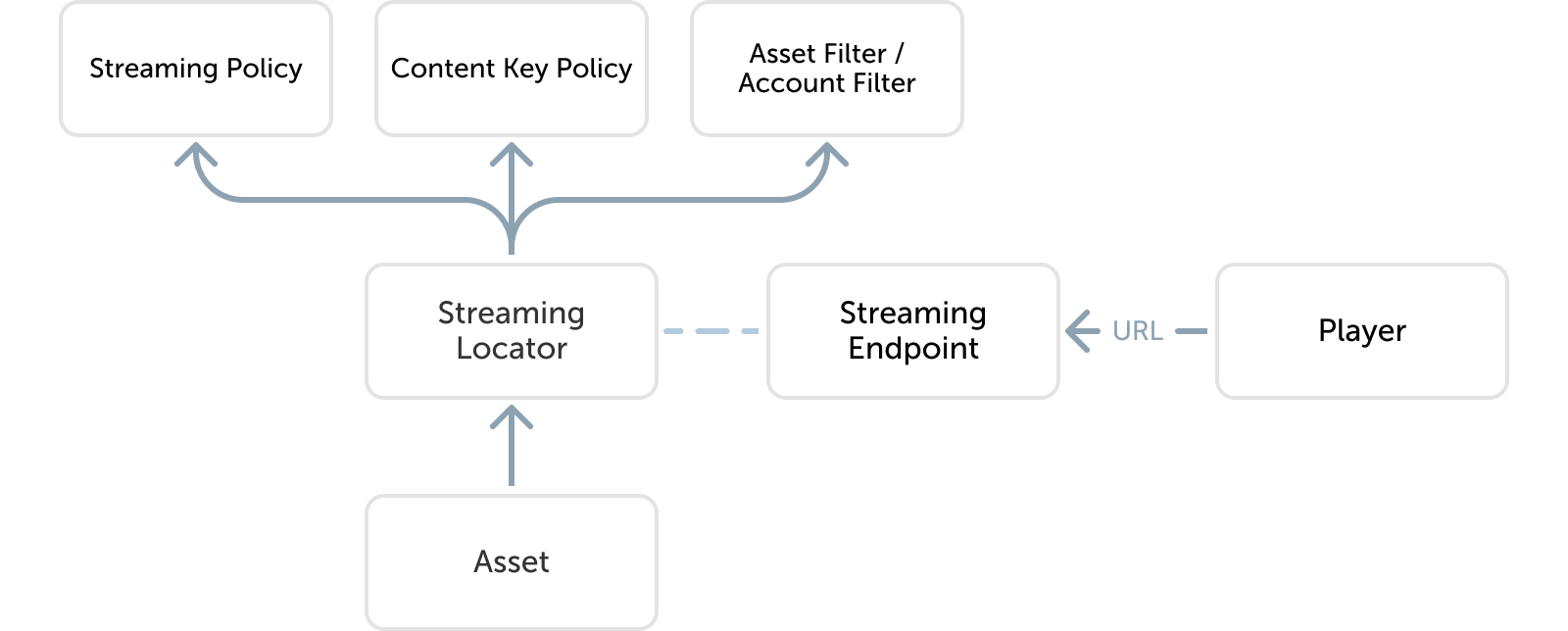
Streaming Locators can have a many-to-one relationship with a Streaming Policy, allowing different Streaming Locators to provide different start times and connection types to different clients while all using the same permission and duration settings.
Streaming formats and encryption modes
The following combinations of streaming formats, DRMs, and encryption modes are currently supported in MK.IO:
| DRM | HLS (CMAF) | DASH (CMAF) |
|---|---|---|
| ClearKey | cbc | cbc & cenc |
| Widevine | cenc | cenc |
| PlayReady | cenc | cenc |
| FairPlay | cbcs-aapl | n/a |
Streaming Policies
Streaming Policies enable you to define streaming protocols and encryption options for your Streaming Locators. With MK.IO, you get several predefined Streaming Policies out of the gate for trial or production use.
| Streaming Policy | Description |
|---|---|
| Predefined_ClearStreamingOnly | Clear streaming only |
| Predefined_ClearKey | Enable HLS/DASH encrypted with envelopeEncryption with MK.IO issuing the content key. |
| Predefined_MultiDrmCencStreaming | Enable streaming with DASH encrypted with commonEncryptionCenc with MK.IO issuing the PlayReady and Widevine license |
| Predefined_MultiDrmStreaming | Enable streaming with DASH encrypted with commonEncryptionCenc with MK.IO issuing the PlayReady and Widevine licenses, or for allowing streaming with HLS encrypted with commonEncryptionCbcs with MK.IO issuing the FairPlay license. |
| Predefined_DownloadOnly | Download only |
| Predefined_DownloadAndClearStreaming | Download and clear streaming |
You can also create your own Streaming Policies if these don’t meet your needs.
Streaming URLs
The URLs for streaming content may be obtained either from the UI or by calling the listPaths endpoint on the streaming locator API resource.
The overall structure of the streaming URL is:
/<streamingLocatorID>/<serverManifestName>.ism/manifest(<options>)
The supported options are:
format=m3u8-cmaffor HLS with CMAF segmentsformat=mpd-time-cmaffor DASH with CMAF segmentsfilter=...with a semicolon-separated list of Asset Filters or Account Filters to be appliedencryption=cbcfor AES-128 encryption scheme (AES CBC full-segment encryption)encryption=cbcs-aaplfor CBCS encryption scheme (AES CBC sample-based encryption)encryption=cencfor CENC encryption scheme (AES CTR sample-based encryption)start=...specifying the start of playback in a live event or recording (ISO8601 UTC)end=...specifying the end of playback in a live event or recording (ISO8601 UTC)vbegin=...specifying the start of playback in a VOD asset (ISO8601 duration)vend=...specifying the end of playback in a VOD asset (ISO8601 duration)
For example:
/fecebb23-46f6-490d-8b70-203e86b0df58/bigbuckbunny.ism/manifest(format=m3u8-cmaf,encryption=cbcs-aapl,filter=myAccountFilter;myAssetFilter)
Download URLs
The URLs for download content can be obtained either from the UI or by calling listPaths on the Streaming Locator resource in the API.
The download URL has a simpler structure with no options:
/<streamingLocatorID>/filename
For example:
/fecebb23-46f6-490d-8b70-203e86b0df58/Thumbnail1_000001.png
Playback availability window
The availability of the Streaming Locator for playback can be constrained to a specific time window using the startTime and endTime fields in the Streaming Locator resource via the API or the Expiration time field in the UI.
- If a request is made for the Streaming Locator before the start time, the Streaming Endpoint will respond
404 Not Found. - If a request is made for the Streaming Locator after the end time, the Streaming Endpoint will respond
410 Gone.